A Comprehensive Guide to Docker: Architecture, Components, Advantages and Limitations
Docker is a containerization platform that packages an application and all its dependencies into lightweight containers, ensuring consistent performance across development, testing, and production environments. This Docker architecture guide explains how Docker simplifies application creation, deployment, and execution. As a core containerization tutorial concept, understanding Docker components helps teams build, ship, and run applications more efficiently using containers.
Docker Architecture
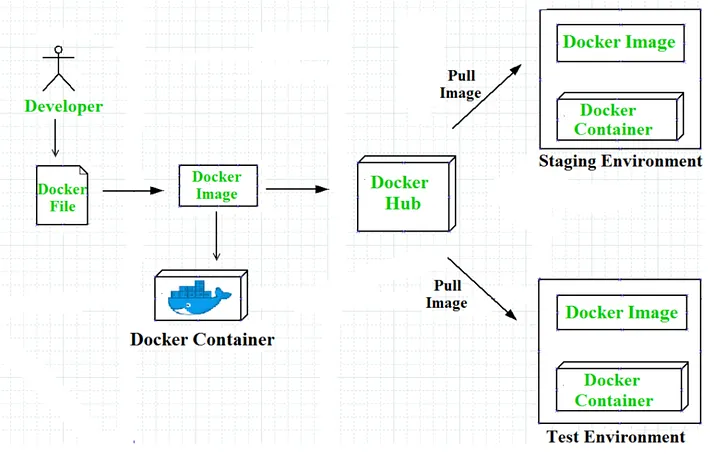
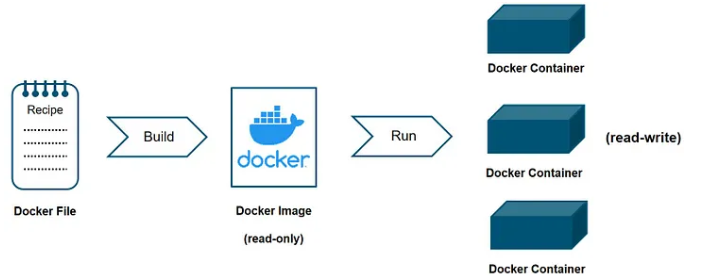
Workflow of Docker
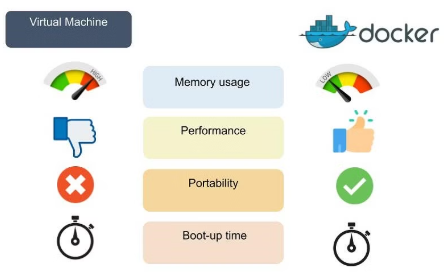
Docker VS Virtual Machines
Advantages of Docker
Docker has become popular nowadays because of the benefits provided by Docker containers. The main advantages of Docker are:
- Speed: The speed of Docker containers compared to a virtual machine is very fast. The time required to build a container is very fast because they are tiny and lightweight. Development, testing, and deployment can be done faster as containers are small. Containers can be pushed for testing once they have been built and then from there on to the production environment.
- Portability: The applications that are built inside Docker containers are extremely portable. These portable applications can easily be moved anywhere as a single element, and their performance also remains the same.
- Scalability: Docker has the ability to be deployed on several physical servers, data servers, and cloud platforms. It can also be run on every Linux machine. Containers can easily be moved from a cloud environment to a local host and from there back to the cloud again at a fast pace.
- Density: Docker uses the resources that are available more efficiently because it does not use a hypervisor. This is the reason that more containers can be run on a single host as compared to virtual machines. Docker containers have higher performance because of their high density and no overhead wastage of resources.
Disadvantages of Docker:
As convenient as the Docker container mechanism is, it has its drawbacks:
- Complexity: Docker may be complex to comprehend and configure for those unfamiliar with containerization. It takes some technical knowledge to create Docker files, manage container images, handle networking, and arrange containers.
- Security: Any reconfiguration of the containers may potentially expose the system to security risks. Although there are ways to enhance Docker’s safety, it requires expertise and careful attention to detail.
- Performance: While Docker containers are usually more efficient than regular virtual machines, they may not be optimal for resource-intensive applications requiring high performance and low latency, as resources are shared with the host system.
- Compatibility: Containerization may not be suitable for legacy applications or those relying on specific kernel features. What’s more, Docker primarily runs on Linux, and even though there are Docker adaptations for Windows and macOS, some features might differ depending on the operating system (OS).
Components of Docker:
The Docker components are divided into two categories: basic and advanced. The basic components include the Docker client, Docker image, Docker Daemon, Docker Networking, Docker registry, and Docker container, whereas Docker Compose and Docker swarm are the advanced components of Docker.
Basic Docker Components:
Let's dive into basic Docker components:
- Docker Client: The first component of Docker is the client, which allows the users to communicate with Docker. Being a client-server architecture, Docker can connect to the host remotely and locally. As this component is the foremost way of interacting with Docker, it is part of the basic components. Whenever a user gives a command to Docker, this component sends the desired command to the host, which further fulfills the command using the Docker API. If there are multiple hosts, then communicating with them is not an issue for the client, as it can interact with multiple hosts.
- Docker Image: Docker images are used to build containers and hold the entire metadata that elaborates the capabilities of the container. These images are read-only binary templates in YAML. Every image comes with numerous layers, and every layer depends on the layer below it.
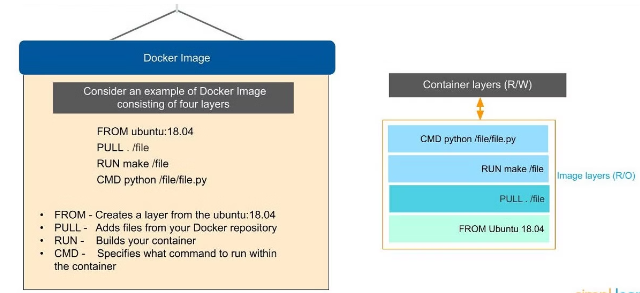
The first layer is called the base layer, which contains the base operating system and image. The layer with dependencies will come above this base layer. These layers will have all the necessary instructions in read-only, which will be the Dockerfile. A container can be built using an image and can be shared with different teams in an organization through a private container registry. In case you want to share the same outside the organization, you can use a public registry for the same.
Docker Daemon: Docker Daemon is among the most essential components of Docker as it is directly responsible for fulfilling the actions related to containers. It mainly runs as a background process that manages parts like Docker networks, storage volumes, containers, and images. Whenever a container start up command is given through docker run, the client translates that command into an HTTP API call and returns it to the daemon. Afterwards, the daemon analyses the requests and communicates with the operating system. The Docker daemon will only respond to the Docker API requests to perform the tasks. Moreover, it can also manage other Docker services by interacting with other daemons.
Docker Networking: As the name suggests, Docker networking is the component that helps in establishing communication between containers. Docker comes with five main types of network drivers, which are elaborated on below.
- None: This driver will disable the entire networking system, hindering any container from connecting with other containers.
- Bridge: The Bridge is the default network driver for a container which is used when multiple containers communicate with the same Docker host.
- Host: There are stances when the user does not require isolation between a container and a host. The host network driver is used in that case, eradicating this isolation.
- Overlay: Overlay network driver allows communication between different swarm services when the containers run on different hosts.
- macvlan: This network driver makes a container look like a physical driver by assigning a mac address and routing the traffic between the containers through this mac address.
Docker Registry: Docker images require a location where they can be stored and the Docker registry is that location. Docker Hub is the default storage location of images that stores the public registry. However, registries can either be private or public. Every time a Docker pull request is made, the image is pulled from the desired Docker registry where it was the same. On the other hand, Docker push commands store the image in the dedicated registry.
Docker Container: A Docker container is the instance of an image that can be created, started, moved, or deleted through a Docker API. Containers are a lightweight and independent method of running applications. They can be connected to one or more networks and create a new image depending on the current state. Being a volatile Docker component, any application or data located within the container will be scrapped the moment the container is deleted or removed. Containers mostly isolate each other and have defined resources.
Conclusion:
Docker revolutionizes the development, deployment, and management of applications by providing a lightweight, portable, and scalable containerization solution. The architecture along with the components of Docker work in unison to enhance workflows while improving efficiency across various environments. While Docker offers tremendous speed as well as resource optimization, it also brings with it certain complexities and security considerations. All in all though, Docker is an incredibly powerful tool for modern software development, enabling teams to build flexible, reliable, and consistent applications across diverse platforms.
Not sure which approach is right for your project?
We've built both. We'll tell you honestly which one fits.
From no-code MVPs validated in 6 weeks to enterprise AI platforms with 50,000+ users, we've built across the whole range. Book a consultation and we'll tell you honestly which approach fits your budget, your timeline, and your scale ambitions.
Book a discovery call